

KOTORI — Festival Mobile Order
A web-based mobile ordering system that helps festival visitors order and pay in advance and skip long queues at booths.
No app download
Instant browser access via QR code

Cashless and secure
A familiar, low-friction checkout

Next plan

Multi-language support
English, Japanese, Vietnamese, Chinese, Portuguese, Bahasa Indonesia






● TL;DR
A faster festival experience, proven live
1,100+
transactions,
Phase 1 → 2
2 → 23
booths across live deployments
Validated
less congestion at scale
¥1.6M+
sales at Vietnam Festival Tokyo 2026
*Data retrieved from KOTORI Phase 1 and Phase 2 user testing sprints.
MY ROLE
End-to-end product design for live festival operations
UX/UI Designer
Product Strategy
Event Execution
View Live Web App
View Official Website
View User Test Results
Explore Design Process
See Details for Tenant Page
01 — PROBLEM STATEMENT
Background
Why we should start KOTORI?
CONTEXT
KOTORI began from an opportunity we discovered through Smiles Mobile Remittance. As Smiles grew and became a major sponsor of multicultural festivals across Japan, our team worked closely with event organizers and observed the festival experience firsthand.
Large crowds created long food queues, forcing visitors to spend too much time waiting instead of enjoying the festival. Vendors had limited time and capacity to serve large crowds through traditional physical queues.
First Problem
How might we make festival food ordering faster without adding complexity for visitors or Stores?
CONTEXT
Popular festival booths can develop long queues during peak hours. Visitors may spend significant time waiting for food instead of exploring the event. At the same time, vendors already operate in a high-pressure environment and cannot manage a complicated additional ordering system.
Issues list
Festival Visitors
QR discoverability — Users may not notice where or how to access KOTORI in the venue.
Pickup lane confusion — KOTORI pickup and regular queues may not be clearly separated.
Crowded environment — Users may be walking, carrying items, or using the app one-handed.
Booth identification — Digital store names may not clearly match the physical booth.
Limited attention — Users need to understand the flow quickly without reading too much.
Multi-order confusion — Users ordering from multiple stores may struggle to identify which order is ready.
Missed notifications — “Ready” notifications can be overlooked in a busy and noisy festival.
Menu availability mismatch — Physical booth menus and KOTORI menus may not always match, especially for drinks.
Unclear waiting time — Users may not know how long their order will take to prepare.
Trust & adoption — First-time users may hesitate to use an unfamiliar ordering service.
Slow connectivity — Crowded venues can have unstable internet, creating slow loading or blank web-app screens that may cause users to abandon the flow.
Payment accessibility — Credit-card-only checkout may create friction for some international festival visitors who prefer other payment methods.
SmilesPay opportunity — Since KOTORI reaches multicultural festival audiences already connected to the Smiles ecosystem, SmilesPay integration could provide a more familiar payment option and support adoption among existing Smiles users.
Explore Design Process
Festival Tenant/Store
Multi-channel orders — Manage walk-in + digital orders simultaneously
Fast order processing — Identify and process orders quickly
Limited setup time — Configure and learn the system with minimal training
Missed orders — Incoming orders can be overlooked during peak hours
Status management — Quickly update Preparing → Ready → Received
Real-time availability — Mark sold-out items immediately
Network reliability — Operate under unstable event connectivity
Menu management — Easily create and update menus
Staff coordination — Manage multiple roles and clarify order responsibilities
Pickup separation — Distinguish regular queues from KOTORI pickup
Signage consistency — Maintain clear QR codes and pickup signage
Minimal attention — Operate KOTORI while preparing and serving food
See Details for Tenant Page
Product Roadmap
A roadmap for the next stage of KOTORI
#
Initiative
Category
Timeline
Status
Dependency
01
Event Expansion —
join more festivals in Japan
Events & Vendor Acquisition
2026 H1
→
2027 H2
ongoing
Live / ongoing
—
02
Vendor Promotion at Events —
encourage vendors to use KOTORI at their main store, not just the festival
Events & Vendor Acquisition
2026 H2
→
2027 H1
In development
Runs alongside #1
03
Non-Festival Ordering —
build the capability for KOTORI to receive orders outside festival events
Product & Store Expansion
2026 H2
→
2027 H1
In development
—
04
Store Rollout —
launch KOTORI ordering at partner stores
Product & Store Expansion
2027 H1
→
Beyond
Planned
Depends on #3
05
PayPay Integration —
add as a payment method
Payments
2026 H2
→
2027 H1
Planned
—
06
SmilesPay Integration —
integrate once the updated SmilesPay is ready
Payments
2027 H1
→
Beyond
Conditional
Depends on SmilesPay dev readiness
07
Smiles In-App Banner Promotion —
ongoing KOTORI promotion via Smiles Mobile Remittance
Marketing & Promotion
2026 H1
→
Beyond
continuous
Continuous channel
—
Competitor research
Competitor Research
UNDERSTANDING THE USERS
Designing for two sides of the festival
Festival Visitors
Want to enjoy the event without wasting time in line.
First-time Users
Prefer a simple, intuitive ordering experience from the first tap.
Food Vendors
Want to serve more customers efficiently with limited staff.
KEY INSIGHT
Visitors want a fast and easy way to order, while vendors want to increase sales without increasing workload.
Interview
Interview
Interviews with our multicultural team members in Digital Wallet Corporation Office, who also take part in festivals from their home countries here in Japan.

8
Participants
2 Japanese, 2 Indonesians,
2 Philippines, 2 Vietnamese.
Nationalities
100%
Would use service
Participant demograhic
User research findings
Feature importance ranking
USER JOURNEY
From queuing to collecting
BEFORE · TRADITIONAL ORDERING
Go to booth → See long queue → Wait 20–60 minutes → Order & pay → Receive food
AFTER · WITH KOTORI
Scan QR → Order & pay instantly → Receive order number → Pick up at booth → No waiting
Customer User Flow
1
Scan QR Code
Find participating vendor
2
Discover
Find participating vendor

3
Browse
Choose food

4
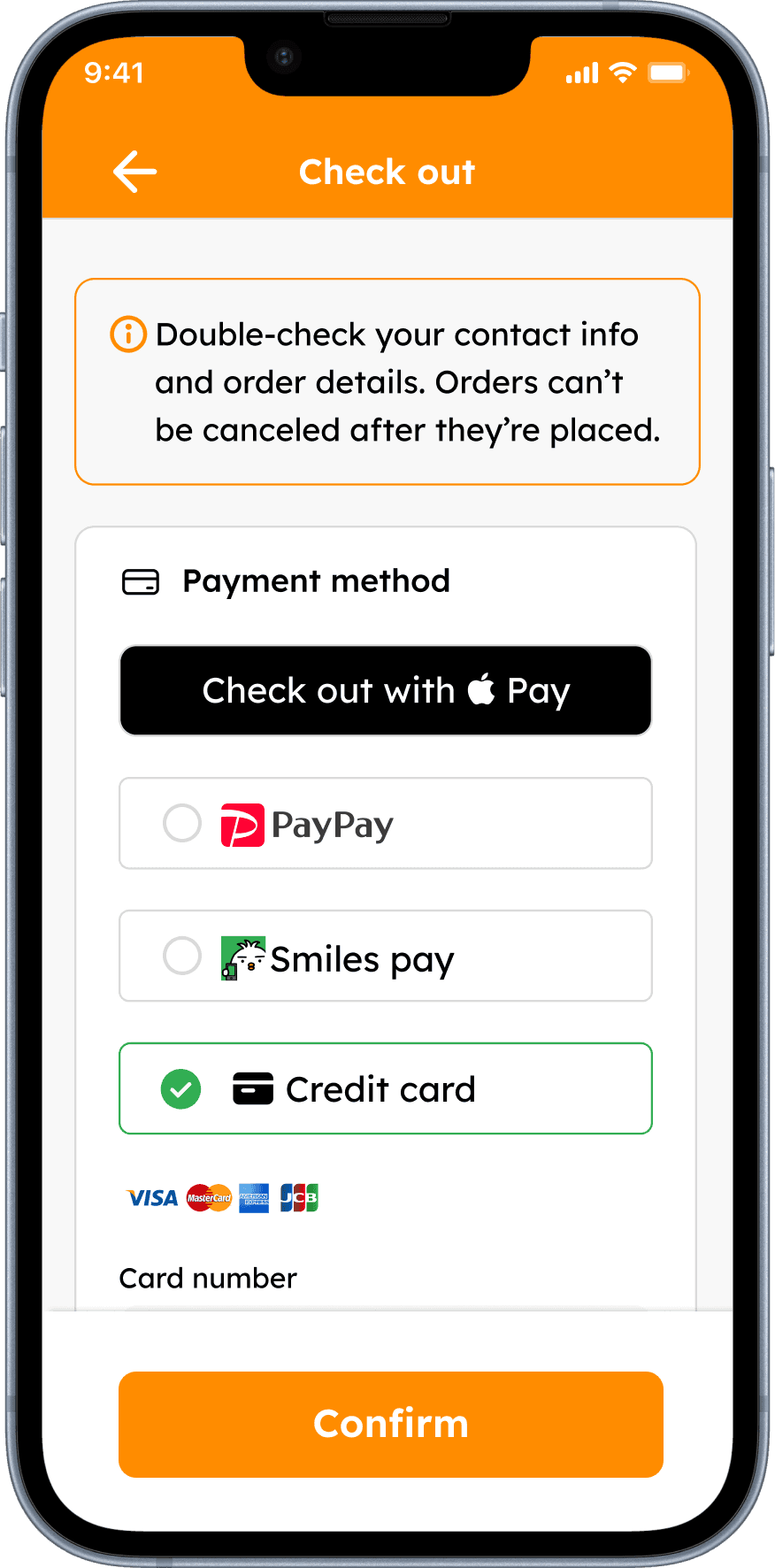
Order
Cart, verification + payment
4
Wait
Continue enjoying festival

5
Navigate
Find booth

6
Pick Up
Use dedicated KOTORI lane

Tenant User Flow
See Details for Tenant Page
Design Process
Design Process
The design process differed from a typical product design workflow. Due to the tight release timeline, we began with focused discussions with the Product Managers to align on branding, user flows, wireframes, and the overall product direction. After establishing the key requirements, we moved directly into high-fidelity (Hi-Fi) design to accelerate development and meet the release deadline.
Assets

Promotion

On site Design needs
UX UI Design
Designer & PM page - Direct HI-FI Design
KOTORI design progress start directly with the userflow system and directly design the high fidelity design.

Handover
Engineer Page - UI
Three example for UI flow from customer page

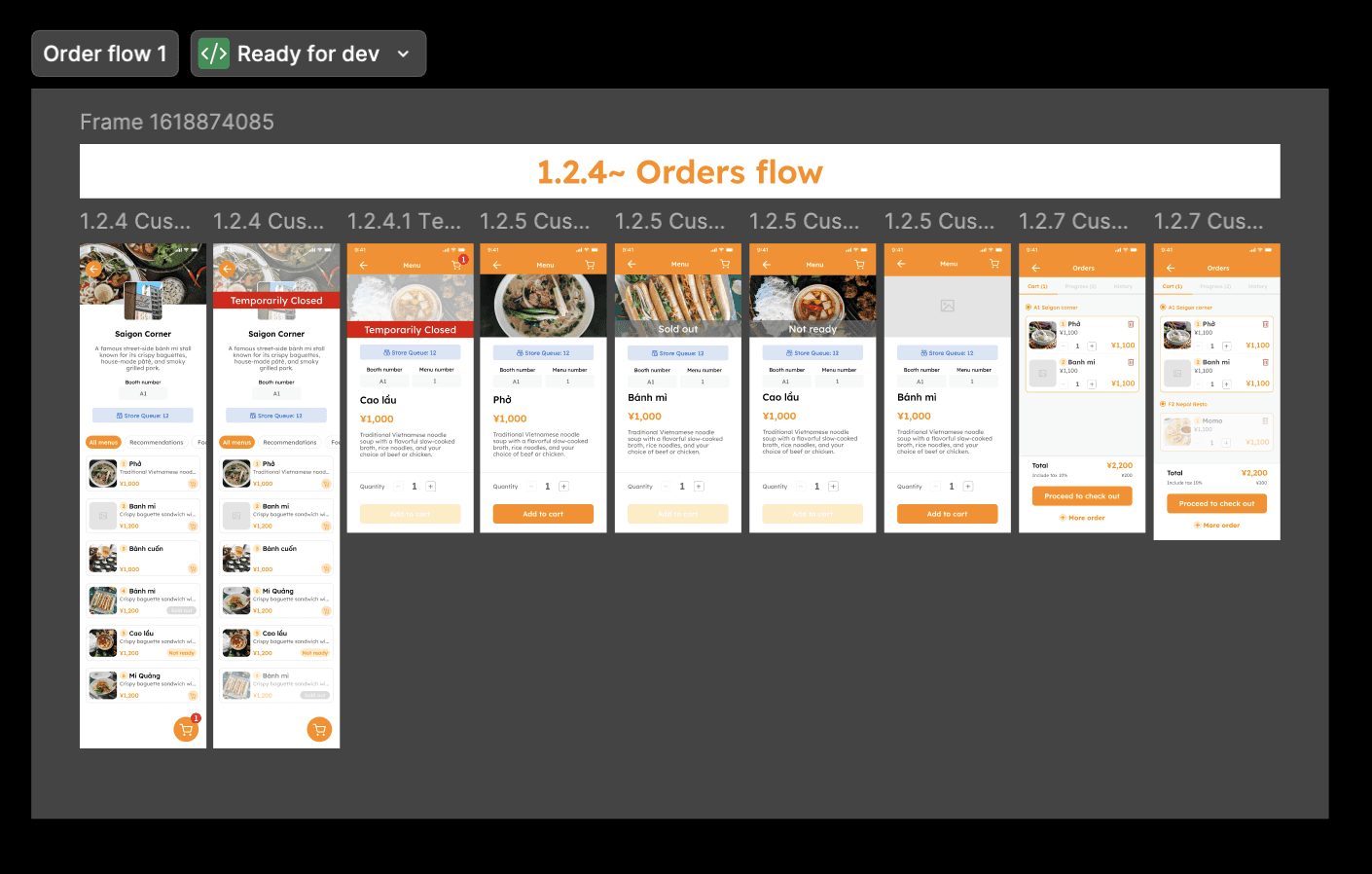

Engineer Page - User flow
One example of the User flow explanation for Engineer

Engineer Page - Error message
One example of the User flow which containing error message explanation for Engineer


Engineer Page - Request and UX Adjustment [Teams]


UI Design
UI screen results
The customer journey is shown across five essential moments — from secure access to order completion and account preferences.
On-site UX for QR discoverability and Pick Up Lane Confusion
1
Problem
-
Solution
-
Flow
-
Home screen

1
Problem
-
Solution
-
Flow
Select menu → Review order → Log in → Choose language → Enter email → Enter verification code → Accept Terms & Conditions → Continue checkout
Order


1
Problem
Customers want a fast, direct ordering experience.
System side- Orders are limited to one store at a time. Users must complete payment before ordering from another store.
Solution
Show queue status and estimated wait time to set expectations.
Add menu categories for faster browsing.
View multiple menus at once for faster browsing.
Add a direct “Add” button for quicker ordering.
Keep orders limited to one store per transaction based on system constraints.
Ask users to log in only after completing their order selection to save their details.
Flow
Select Store → Check Queue → Browse Category → Add Items → Review Order → Log In → Continue to Checkout
Browsing - Easy to find stores and menu flow
1
Problem
-
Solution
-
Flow
-
Oversee multiple store orders, including preparing, ready, and cancelled statuses.
1
Problem
-
Solution
-
Flow
-
Login — Guest-like Login (with Email Save)

1
Problem
Users struggled with account registration, PIN verification, and were reluctant to input personal or payment information.
Solution
Introduced guest checkout (no registration required)
Simplified verification flow (reduced dependency on email PIN)
Minimized required inputs to enable faster ordering
Flow
Select menu → Review order → Log in → Choose language → Enter email → Enter verification code → Accept Terms & Conditions → Continue checkout
Payment/Checkout flows

1
Problem
-
Solution
-
Flow
-
Settings

1
Problem
-
Solution
-
Flow
-
No Connection situation
1
Problem
-
Solution
-
Flow
-
Payment - Improve trust and strengthen security in the payment process.
1
Problem
-
Solution
-
Flow
-
PHASE 1 — USER SPRINT TEST
Live validation at Vietnam Festival Osaka 2026
We conducted a live user sprint test in a real event environment to validate usability, user behavior, and business performance under festival conditions.
320
users in 2 days
131 → 189 growth
¥70,750
total sales
73 transactions
~¥951
average order value
77%
iOS usage
Safari-first priority
User Origin
Majority: Japan
Minor: USA (1), Vietnam (1)
Browser Usage
Safari: 209 users (~65%)
Chrome: 109 users (~34%)
Firefox: 2 · Unknown: 2
Insight: Safari is the primary environment—critical for UX stability.
Behavior Insights
Day 1 → Day 2 grew from 131 to 189 users, indicating organic adoption during the event. Some users ordered from multiple stores, showing repeat usage and high engagement.
Payment Behavior
Payment data was unavailable in the current dataset. Feedback showed reluctance to register credit cards and a preference for simpler, lower-friction payment methods.
Exact hourly traffic was unavailable, but network issues appeared after ~3 PM. Qualitative feedback indicated high afternoon congestion and the need for peak-load resilience.
Key Insights
Registration is the biggest conversion barrier. Safari-first optimization is critical. Peak-time reliability is essential. Digital and physical experiences must be tightly connected. Simplicity beats features in real-world environments.
PHASE 2 — PRODUCT VALIDATION AT SCALE
Product validation at scale
Following Phase 1 improvements, KOTORI was deployed at Vietnam Festival Tokyo 2026 to validate scalability, usability, and business impact across a larger live-event environment.
KEY RESULTS
¥1.61M+
total sales
1,118
transactions
1,867
items sold
23
active booths
~¥1,446
average order value
2 → 23
booths from Phase 1
PROBLEMS OBSERVED
Order status friction — Staff sometimes missed orders or left them in “Preparing,” requiring customers to approach the booth.
Pickup inconsistency — Dedicated KOTORI lanes and signage were not standardized across booths.
Low discoverability — QR placement and KOTORI branding varied between stores.
Multi-order confusion — Similar order cards and unclear “Preparing” vs “Ready” states made tracking multiple orders difficult.
Network & menu limitations — Unstable connectivity disrupted ordering, while incomplete drink menus limited food + drink purchases.
KEY INSIGHTS
Visibility drives adoption, while clear order status and standardized booth operations are critical when scaling.
Phase 2 also showed that KOTORI’s UX extends beyond the screen — the QR signage, pickup lane, vendor workflow, and network environment are all part of the customer experience.
NEXT ITERATION
• Simplify Preparing → Ready → Received status management
• Strengthen visual differences between order statuses
• Standardize QR + pickup signage across booths
• Improve multi-store order tracking
• Optimize for unstable network conditions
• Simplify vendor menu setup with reusable presets
BANNER ADVERTISING PERFORMANCE — PARTICIPATING STORES
4,218
banner ad impressions
1,731
active users via ads
¥186,150
sales from advertising stores
DIRECT PURCHASE IMPACT
Participating stores ranked 3rd overall, demonstrating a direct purchase impact from banner ad exposure.
OUTCOME
Phase 2 validated KOTORI at scale, growing from 2 → 23 booths and generating ¥1.6M+ in sales, while uncovering operational UX challenges that informed the next product iteration.
Partner Festivals
Built alongside Japan’s multicultural festival organizers
Vietnam Festival
Festival organizer partner in Japan

China Festival
Festival organizer partner in Japan
Brazil Festival
Festival organizer partner in Japan
Nepal Festival
Festival organizer partner in Japan
Indonesia Festival
Festival organizer partner in Japan

Philippine Festival
Festival organizer partner in Japan
OUTCOMES & LEARNINGS
Live validation turned assumptions into evidence
QUANTITATIVE OUTCOME
320 → 1,118
Phase 1 users → Phase 2 transactions
2 → 23
participating booths
¥1.61M+
Phase 2 sales
1,867
items sold
QUALITATIVE OUTCOME
Live testing showed that KOTORI could provide clear value when dedicated pickup worked correctly: visitors could collect orders without joining the main physical queue. At the same time, testing revealed that customer UX depends heavily on vendor behavior, signage, and connectivity.
WHAT I LEARNED
Vendor UX is customer UX
A perfectly designed customer status screen fails if the vendor does not update the order.
Physical UX matters
Booth numbers, QR codes, maps, and pickup signage are part of the product.
Real environments reveal different problems
Connectivity, crowd movement, and vendor workload are difficult to reproduce through prototype testing alone.
REFLECTION
What I would improve next
01 — MEASURE FUNNEL CONVERSION
Track Store View → Menu → Cart → Verification → Payment → Order to identify exactly where customers abandon.
02 — MEASURE OPERATIONS
Add metrics for average preparation time, Ready → Pickup time, order completion rate, and missed-order rate.
03 — DESIGN FOR NETWORK FAILURE
Explore lightweight loading states, clearer connectivity feedback, and recovery behavior for unstable festival networks.
04 — STANDARDIZE THE PHYSICAL EXPERIENCE
Create a consistent system for QR placement, KOTORI branding, booth numbers, dedicated pickup lanes, and vendor instructions.
05 — TEST EARLIER WITH VENDORS
Involve booth staff earlier in prototype testing instead of relying primarily on issues discovered during live operations.
UX SUCCESS CRITERIA
How KOTORI measures product value
A live-event product succeeds when it works for visitors, vendors, and the physical festival environment—at the same time.
CRITERIA
WHAT WE MEASURE
KOTORI IMPACT
Adoption
Are visitors actually using KOTORI?
4,878 active users at Vietnam Festival Tokyo
Engagement
Are users actively interacting with the service?
76.09% engagement rate, average 4m 53s
Task Success
Can users order and complete pickup?
1,118 transactions and 1,867 items sold
Discoverability
Can users find KOTORI and participating booths?
QR placement, booth identification, and signage were key improvement areas
Order Clarity
Can users understand order progress?
Testing revealed Preparing / Ready confusion, informing a clearer status hierarchy
Pickup Experience
Can users collect orders without joining regular queues?
Dedicated KOTORI pickup demonstrated the value of bypassing physical queues
Vendor Usability
Can staff manage orders during peak operations?
Simplified Preparing → Ready → Received and improved order visibility
Reliability
Does the experience work in festival conditions?
Slow and unstable connections were identified as a critical UX constraint
Business Impact
Does improved UX create commercial value?
¥1.61M+ sales across 23 active booths
Scalability
Can the experience expand beyond initial testing?
Expanded from 2 → 23 booths between validation phases
FINAL TAKEAWAY
More than a mobile ordering interface
KOTORI started as a solution to long festival queues, but live testing showed that the challenge was larger than designing a mobile ordering interface.
The product needed to connect:
Customer UX × Vendor Operations × Physical Space × Technology
Through two live validation phases, KOTORI evolved from an early experiment with 320 users into a platform supporting 23 booths, 1,118 transactions, and ¥1.61M+ in sales.
THE PRODUCT-DESIGN APPROACH
Design → Test in Context → Learn → Iterate → Measure → Scale
Bhaswara Maralaut
More projects and experiences are always on the way.
Let's keep in touch!